最近从ITbobo那移植来的wordpress投稿功能,分享给大家!
之前本站有发布过一款仿新版蛋花儿主题,这款wordpress主题得到很多朋友的喜欢,可收到很多朋友的反馈说是要增加wordpress投稿功能,当时忙于其他的事情,一直没顾及上这款wordpress主题的维护工作!
而最近经常收到一些投稿主题的邮件,也是因为本站没有一个wordpress投稿功能,所以一直用发邮件代替着,其实站哈源码网知道有很多的投稿插件,但是站哈源码网一直提倡远离插件,提升速度的口号!
于是站哈源码网前些天从好友ITbobo主题里移植了其wordpress投稿功能,感觉十分的强大,纯代码完成!效率高!也易于使用!
不多说哈,开始教程啦!
首先在wordpress主题的根目录新建一个tougao.php,将下面的代码插入。。。对是插入!
<?php
/*
Template Name: 投稿页面
*/
if( isset($_POST['tougao_form']) && $_POST['tougao_form'] == 'send'){
if( isset($_COOKIE["tougao"]) && ( time() - $_COOKIE["tougao"] ) < 120 ){
wp_die('您投稿也太勤快了吧,先歇会儿!');
}
//表单变量初始化
$name = isset( $_POST['tougao_authorname'] ) ? $_POST['tougao_authorname'] : '';
$email = isset( $_POST['tougao_authoremail'] ) ? $_POST['tougao_authoremail'] : '';
$blog = isset( $_POST['tougao_authorblog'] ) ? $_POST['tougao_authorblog'] : '';
$title = isset( $_POST['tougao_title'] ) ? $_POST['tougao_title'] : '';
$tags = isset( $_POST['tougao_tags'] ) ? $_POST['tougao_tags'] : '';
$category = isset( $_POST['cat'] ) ? (int)$_POST['cat'] : 0;
$content = isset( $_POST['tougao_content'] ) ? $_POST['tougao_content'] : '';
//表单项数据验证
if ( emptyempty($name) || strlen($name) > 20 ){
wp_die('昵称必须填写,且不得超过20个长度');
}
if ( emptyempty($email) || strlen($email) > 60 || !preg_match("/^([a-z0-9\+_\-]+)(\.[a-z0-9\+_\-]+)*@([a-z0-9\-]+\.)+[a-z]{2,6}$/ix", $email)){
wp_die('邮箱必须填写,且不得超过60个长度,必须符合 Email 格式');
}
if ( emptyempty($title) || strlen($title) > 100 ){
wp_die('文章标题必须填写,且不得超过100个长度');
}
if ( emptyempty($content) || strlen($content) < 100){
wp_die('内容必须填写,且不得少于100个长度');
}
$tougao = array('post_title' => $title,'post_content' => $content,'post_status' => 'pending','tags_input' => $tags,'post_category' => array($category));
$status = wp_insert_post( $tougao );//将文章插入数据库
if ($status != 0){
global $wpdb;
$myposts = $wpdb->get_results("SELECT ID FROM $wpdb->posts WHERE post_status = 'pending' AND post_type = 'post' ORDER BY post_date DESC");
add_post_meta($myposts[0]->ID, 'tcp_postauthor', $name); //插入投稿人昵称的自定义域
if( !emptyempty($blog))
add_post_meta($myposts[0]->ID, 'tcp_posturl', $blog); //插入投稿人网址的自定义域
setcookie("tougao", time(), time()+180);
wp_die('投稿成功!','投稿成功!');
}else{
wp_die('投稿失败!','投稿失败!');
}
}
get_header();
?>
<body>
<?php if (have_posts()) : ?><?php while (have_posts()) : the_post(); ?>
<div id="wrapper" class="clearfix">
<div class="tougao divmargin">
<div class="entryy" style="background-color: #FFF8D9;border: 1px solid #FEBE8F;border-radius: 2px;color: #FF6600;padding:5px;margin:10px 10px 0px 10px;font-size:13px;">
<?php the_content('More »'); ?>
</div>
<div class="entryy">
<form method="post" action="<?php echo $_SERVER["REQUEST_URI"]; ?>">
<div id="basicinfo">
<p>
<label>作者昵称:</label>
<input type="text" value="" name="tougao_authorname" />
<small>*</small>
</p>
<p>
<label>E-Mail:</label>
<input type="text" value="" name="tougao_authoremail" />
<small>*</small>
</p>
<p>
<label>您的网站:</label>
<input type="text" value="" name="tougao_authorblog" />
</p>
<p>
<label>文章标题:</label>
<input type="text" value="" name="tougao_title" />
<small>*</small>
</p>
<p>
<label>文章分类:</label>
<?php wp_dropdown_categories('show_count=1&hierarchical=1'); ?>
<small>*</small>
</p>
<p>
<label>关键词:</label>
<input type="text" value="" name="tougao_tags" />
<small>*</small>
</p>
</div>
<div>
<label>文章内容:(必须)</label>
</div>
<div class="post-area">
<textarea rows="15" cols="55" name="tougao_content"></textarea>
</div>
<p>
<input type="hidden" value="send" name="tougao_form" />
<input id="submit" name="submit" type="submit" value="提交文章" />
<input id="reset" name="submit" type="reset" value="重填" />
</p>
</form>
</div>
</div>
</div>
<?php endwhile; else: ?>
<?php endif; ?>
<?php get_footer(); ?>
然后打开wordpress主题根目录下的style.css,将下面代码插入进去,对,,,又是插入!
/***************投稿**************/
.tougao{background: none repeat scroll 0 0 #FFF;border: 1px solid #DBDBDB;border-radius:5px;clear: both;overflow:hidden;height:auto;}
.tougao .entryy{ list-style: none outside none;padding: 15px 0 15px 30px;padding: 10px;}.tougao .entryy p{line-height: 26px;padding-left: 10px;}
#basicinfo p {width:333px;border: 1px solid #CCC;border-radius: 2px;position: relative;text-indent:0px;margin: 0 0 10px;}
#basicinfo p #cat {border: 0 none;width: 255px;}
#basicinfo p:hover, #basicinfo p.on {border-color: #BBB;box-shadow: 0 0 4px #DDD;color: #222;}
#basicinfo p:hover label, #basicinfo p.on label {border-color: #BBB;}
#basicinfo label {border-bottom-left-radius: 2px;border-right: 1px solid #CCC;border-top-left-radius: 2px;display: inline-block;height: 20px; padding: 4px;line-height: 20px;text-align: right;width:62px;}
#basicinfo p small {color: #888;font-size: 12px;left: 350px;position: absolute;}
#basicinfo input {border: 0 none;border-radius: 2px ;height: 20px;line-height: 20px;padding: 4px;width: 250px;color: #444;font-family: microsoft yahei,verdana,arial;font-size: 12px;outline: medium none;}
.post-area {background: none repeat scroll 0 0 #FFF;border-radius: 2px;margin-bottom: 10px;position: relative;}
.post-area  textarea {background: none repeat scroll 0 0 transparent;border: medium none;height: 98px;line-height: 20px;padding: 4px 6px;position: relative;width: 98%;z-index: 2;min-height:320px;border: 1px solid #CCC;}
.tougao .entryy p input#submit{ -moz-transition: all 0.1s ease-out 0s;border: 1px solid #016EBD;border-radius: 3px;display: inline-block;padding: 5px 15px 6px;text-align: center;background-color: #4D90FE;background-image: -moz-linear-gradient(#049CDB, #0179D2);box-shadow: 0 1px 1px #E6E6E6, 0 1px 0 #36AFE2 inset;color: #FFFFFF;text-shadow: 0 0 1px #016EBD;cursor:pointer;width:auto;}
.tougao .entryy p input#reset{ -moz-transition: all 0.1s ease-out 0s;background-color: #F9F9F9;background-image: -moz-linear-gradient(#F9F9F9, #F1F1F1);border: 1px solid #CCC;border-radius: 3px;box-shadow: 0 1px 1px #E6E6E6, 0 1px 0 #FFF inset;color: #444;display: inline-block;padding: 5px 15px 6px;text-align: center;text-shadow: 0 0 1px #FEFEFE;cursor:pointer;width:auto;}
.tougao .entryy p #submit:hover, .tougao .entryy p #reset:hover {color:red;}
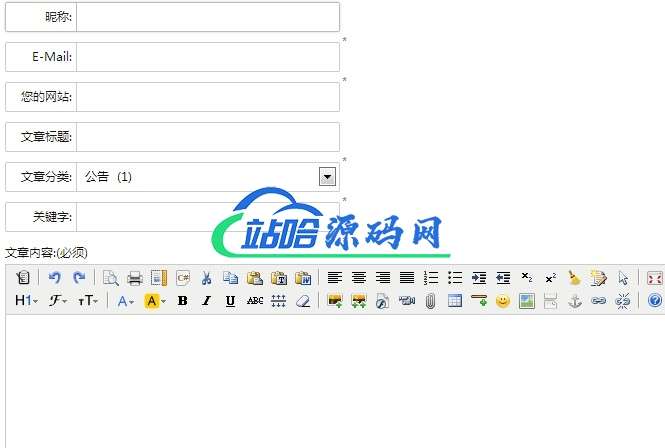
只需两步,轻松完成wordpress投稿功能!然后新建页面,选择投稿页面即可!!!
大家会发现,编写正文的时候木有编辑按钮选项,站哈源码网是考虑到一些被上传乱七八糟附件,所以没加!!!如果有需要,那么开始新的教程!!!
同样是在wordpress主题根目录新建tougao.php,然后插入下面的代码!
<?php
/*
Template Name: 投稿页面
*/
if( isset($_POST['tougao_form']) && $_POST['tougao_form'] == 'send'){
if( isset($_COOKIE["tougao"]) && ( time() - $_COOKIE["tougao"] ) < 120 ){
wp_die('您投稿也太勤快了吧,先歇会儿!');
}
//表单变量初始化
$name = isset( $_POST['tougao_authorname'] ) ? $_POST['tougao_authorname'] : '';
$email = isset( $_POST['tougao_authoremail'] ) ? $_POST['tougao_authoremail'] : '';
$blog = isset( $_POST['tougao_authorblog'] ) ? $_POST['tougao_authorblog'] : '';
$title = isset( $_POST['tougao_title'] ) ? $_POST['tougao_title'] : '';
$tags = isset( $_POST['tougao_tags'] ) ? $_POST['tougao_tags'] : '';
$category = isset( $_POST['cat'] ) ? (int)$_POST['cat'] : 0;
$content = isset( $_POST['tougao_content'] ) ? $_POST['tougao_content'] : '';
//表单项数据验证
if ( emptyempty($name) || strlen($name) > 20 ){
wp_die('昵称必须填写,且不得超过20个长度');
}
if ( emptyempty($email) || strlen($email) > 60 || !preg_match("/^([a-z0-9\+_\-]+)(\.[a-z0-9\+_\-]+)*@([a-z0-9\-]+\.)+[a-z]{2,6}$/ix", $email)){
wp_die('邮箱必须填写,且不得超过60个长度,必须符合 Email 格式');
}
if ( emptyempty($title) || strlen($title) > 100 ){
wp_die('文章标题必须填写,且不得超过100个长度');
}
if ( emptyempty($content) || strlen($content) < 100){
wp_die('内容必须填写,且不得少于100个长度');
}
$tougao = array('post_title' => $title,'post_content' => $content,'post_status' => 'pending','tags_input' => $tags,'post_category' => array($category));
$status = wp_insert_post( $tougao );//将文章插入数据库
if ($status != 0){
global $wpdb;
$myposts = $wpdb->get_results("SELECT ID FROM $wpdb->posts WHERE post_status = 'pending' AND post_type = 'post' ORDER BY post_date DESC");
add_post_meta($myposts[0]->ID, 'tcp_postauthor', $name); //插入投稿人昵称的自定义域
if( !emptyempty($blog))
add_post_meta($myposts[0]->ID, 'tcp_posturl', $blog); //插入投稿人网址的自定义域
setcookie("tougao", time(), time()+180);
wp_die('投稿成功!','投稿成功!');
}else{
wp_die('投稿失败!','投稿失败!');
}
}
get_header();
?>
<div class="nyadtop">
<a href="https://www.zhanha.cn/theme-customization" target="_blank"><img alt="wordpress主题定制" title="wordpress主题定制" src="<?php bloginfo('template_directory'); ?>/images/nyadtop.png"></a>
</div>
<body>
<script type="text/javascript" src="<?php bloginfo('template_url'); ?>/kindeditor/kindeditor-min.js"></script>
<script type="text/javascript" src="<?php bloginfo('template_url'); ?>/kindeditor/lang/zh_CN.js"></script>
<script type="text/javascript">
var editor;
KindEditor.ready(function(K) {
editor = K.create('textarea[name="tougao_content"]', {
allowFileManager : false,
allowImageUpload : false,
});
});
</script>
<?php if (have_posts()) : ?><?php while (have_posts()) : the_post(); ?>
<div id="wrapper" class="clearfix">
<div class="tougao divmargin">
<div class="entry" style="background-color: #FFF8D9;border: 1px solid #FEBE8F;border-radius: 2px;color: #FF6600;padding:5px;margin:10px 10px 0px 10px;font-size:13px;">
<?php the_content('More »'); ?>
</div>
<div class="entry">
<form method="post" action="<?php echo $_SERVER["REQUEST_URI"]; ?>">
<div id="basicinfo">
<p>
<label>昵称:</label>
<input type="text" value="" name="tougao_authorname" />
<small>*</small>
</p>
<p>
<label>E-Mail:</label>
<input type="text" value="" name="tougao_authoremail" />
<small>*</small>
</p>
<p>
<label>您的网站:</label>
<input type="text" value="" name="tougao_authorblog" />
</p>
<p>
<label>文章标题:</label>
<input type="text" value="" name="tougao_title" />
<small>*</small>
</p>
<p>
<label>文章分类:</label>
<?php wp_dropdown_categories('show_count=1&hierarchical=1'); ?>
<small>*</small>
</p>
<p>
<label>关键字:</label>
<input type="text" value="" name="tougao_tags" />
<small>*</small>
</p>
</div>
<div>
<label>文章内容:(必须)</label>
</div>
<div class="post-area">
<textarea rows="15" cols="55" name="tougao_content"></textarea>
</div>
<p>
<input type="hidden" value="send" name="tougao_form" />
<input id="submit" name="submit" type="submit" value="提交文章" />
<input id="reset" name="submit" type="reset" value="重填" />
</p>
</form>
</div>
</div>
</div>
<?php endwhile; else: ?>
<?php endif; ?>
<?php get_footer(); ?>
将下面的CSS放进wordpress主题根目录style.css里
/***************投稿**************/
.tougao{background: none repeat scroll 0 0 #FFF;border: 1px solid #DBDBDB;border-radius:5px;clear: both;overflow:hidden;height:auto;}
.tougao .entry{ list-style: none outside none;padding: 15px 0 15px 30px;padding: 10px;}
#basicinfo p {width:333px;border: 1px solid #CCC;border-radius: 2px;position: relative;text-indent:0px;margin: 0 0 10px;}
#basicinfo p #cat {border: 0 none;width: 255px;}
#basicinfo p:hover, #basicinfo p.on {border-color: #BBB;box-shadow: 0 0 4px #DDD;color: #222;}
#basicinfo p:hover label, #basicinfo p.on label {border-color: #BBB;}
#basicinfo label {border-bottom-left-radius: 2px;border-right: 1px solid #CCC;border-top-left-radius: 2px;display: inline-block;height: 20px; padding: 4px;line-height: 20px;text-align: right;width:62px;}
#basicinfo p small {color: #888;font-size: 12px;left: 336px;position: absolute;}
#basicinfo input {border: 0 none;border-radius: 2px ;height: 20px;line-height: 20px;padding: 4px;width: 250px;color: #444;font-family: microsoft yahei,verdana,arial;font-size: 12px;outline: medium none;}
.post-area {background: none repeat scroll 0 0 #FFF;border-radius: 2px;margin-bottom: 10px;position: relative;}
.post-area  textarea {background: none repeat scroll 0 0 transparent;border: medium none;height: 98px;line-height: 20px;padding: 4px 6px;position: relative;width: 98%;z-index: 2;min-height:320px;}
.tougao .entry p input#submit{ -moz-transition: all 0.1s ease-out 0s;border: 1px solid #016EBD;border-radius: 3px;display: inline-block;padding: 5px 15px 6px;text-align: center;background-color: #4D90FE;background-image: -moz-linear-gradient(#049CDB, #0179D2);box-shadow: 0 1px 1px #E6E6E6, 0 1px 0 #36AFE2 inset;color: #FFFFFF;text-shadow: 0 0 1px #016EBD;cursor:pointer;width:auto;}
.tougao .entry p input#reset{ -moz-transition: all 0.1s ease-out 0s;background-color: #F9F9F9;background-image: -moz-linear-gradient(#F9F9F9, #F1F1F1);border: 1px solid #CCC;border-radius: 3px;box-shadow: 0 1px 1px #E6E6E6, 0 1px 0 #FFF inset;color: #444;display: inline-block;padding: 5px 15px 6px;text-align: center;text-shadow: 0 0 1px #FEFEFE;cursor:pointer;width:auto;}
.tougao .entryp #submit:hover, .tougao .entry p #reset:hover {color:red;}
最后将kindeditor富文本编辑器放到wordpress主题根目录下!
下面给出kindeditor富文本编辑器的下载地址!说明下:linux主机下要给予kindeditor文件夹内的attached给予777权限,编辑文件上传配置在php-upload_json.php内修改
2013/10/12 更新下php文件和css文件,之前有人说代码有问题,站哈源码网这下考虑到可能是编码或者代码高亮的问题吧,现在把文件打包了,需要的下载文件包吧!
常见问题FAQ
- 免费下载或者VIP会员专享资源能否直接商用?
- 本站所有资源版权均属于原作者所有,这里所提供资源均只能用于参考学习用,请勿直接商用。若由于商用引起版权纠纷,一切责任均由使用者承担。更多说明请参考 VIP介绍。