给wordpress评论处添加实用工具
wordpress评论框仅仅只有昵称、邮箱、站点和评论内容的话,会不会显得太简单了?当然追求简洁的人来说,可能觉得站点都有点多余,然后,站哈源码网要说的是给wordpress评论处添加实用工具,丰富起我们的评论框吧!
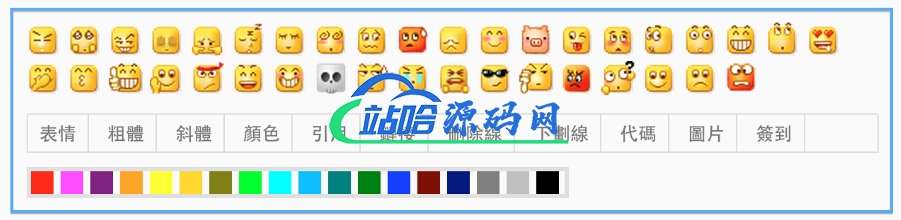
直接给教程吧,comments.php加入按钮
<div id="smiley">
    <?php
    include(TEMPLATEPATH . '/smiley.php');      //你主題引用表情的文件
    /* 如果你使用「Custom Smilies」外掛,請刪除上面那行,並且去除下面這行的注釋 */
    //cs_print_smilies();
    ?>
</div>
<div id="editor_tools">
    <div id="editor">
        <a href="javascript:;" id="comment-smiley"><b>表情</b></a>
        <a href="javascript:SIMPALED.Editor.strong()"><b>粗体</b></a>
        <a href="javascript:SIMPALED.Editor.em()"><b>斜体</b></a>
        <a href="javascript:;" id="font-color"><b>颜色</b></a>
        <a href="javascript:SIMPALED.Editor.quote()"><b>引用</b></a>
        <a href="javascript:SIMPALED.Editor.ahref()"><b>链接</b></a>
        <a href="javascript:SIMPALED.Editor.del()"><b>删除线</b></a>
        <a href="javascript:SIMPALED.Editor.underline()"><b>下划线</b></a>
        <a href="javascript:SIMPALED.Editor.code()"><b>插代码</b></a>
        <a href="javascript:SIMPALED.Editor.img()"><b>插图片</b></a>
    </div>
</div>
<div style="padding-top: 10px;"></div>
<div id="fontcolor">
    <a href="javascript:SIMPALED.Editor.red()" style="background-color: red"></a>
    <a href="javascript:SIMPALED.Editor.fuchsia()" style="background-color: fuchsia"></a>
    <a href="javascript:SIMPALED.Editor.purple()" style="background-color: purple"></a>
    <a href="javascript:SIMPALED.Editor.orange()" style="background-color: orange"></a>
    <a href="javascript:SIMPALED.Editor.yellow()" style="background-color: yellow"></a>
    <a href="javascript:SIMPALED.Editor.gold()" style="background-color: gold"></a>
    <a href="javascript:SIMPALED.Editor.olive()" style="background-color: olive"></a>
    <a href="javascript:SIMPALED.Editor.lime()" style="background-color: lime"></a>
    <a href="javascript:SIMPALED.Editor.aqua()" style="background-color: aqua"></a>
    <a href="javascript:SIMPALED.Editor.deepskyblue()" style="background-color: deepskyblue"></a>
    <a href="javascript:SIMPALED.Editor.teal()" style="background-color: teal"></a>
    <a href="javascript:SIMPALED.Editor.green()" style="background-color: green"></a>
    <a href="javascript:SIMPALED.Editor.blue()" style="background-color: blue"></a>
    <a href="javascript:SIMPALED.Editor.maroon()" style="background-color: maroon"></a>
    <a href="javascript:SIMPALED.Editor.navy()" style="background-color: navy"></a>
    <a href="javascript:SIMPALED.Editor.gray()" style="background-color: gray"></a>
    <a href="javascript:SIMPALED.Editor.silver()" style="background-color: silver"></a>
    <a href="javascript:SIMPALED.Editor.black()" style="background-color: black"></a>
</div>
style.css内加入样式表:
/** 評論工具 **/
#smiley{
padding-bottom: 10px;
}
#editor_tools{
width: 600px;
height: 26px;
line-height: 26px;
border: 1px #e0e0e0 solid;
border-radius: 2px 2px 0 0;
overflow: hidden;
z-index: 99999;
}
#editor_tools a{
color: #777;
display: inline-block;
padding: 0 8px;
height: 26px;
border-right: 1px solid #ddd;
}
#editor_tools a:hover{
color: #333;
text-decoration: none;
}
#fontcolor{
width: 377px;
height: 16px;
line-height: 20px;
border: 2px #e0e0e0 solid;
z-index: 99999;
padding: 2px 0px 2px 2px;
}
#fontcolor a{
display: inline-block;
height: 16px;
width: 16px;
}
增加一个js,例comments.js,期内代码如下:
jQuery(function(){
    jQuery("#smiley").hide(500);
    jQuery("#comment-smiley").click(function(){
        jQuery("#smiley").toggle(500);
    });
});
jQuery(function(){
    jQuery("#fontcolor").hide(500);
    jQuery("#font-color").click(function(){
        jQuery("#fontcolor").toggle(500);
    });
});
jQuery(function(){
    jQuery("#smiley").hide();
    jQuery("#comment").click(function(){
    });
});
jQuery(function(){
    jQuery("#fontcolor").hide();
    jQuery("#comment").click(function(){
    });
});
jQuery(function() {
    function addEditor(a, b, c) {
        if (document.selection) {
            a.focus();
            sel = document.selection.createRange();
            c ? sel.text = b + sel.text + c: sel.text = b;
            a.focus()
        } else if (a.selectionStart || a.selectionStart == '0') {
            var d = a.selectionStart;
            var e = a.selectionEnd;
            var f = e;
            c ? a.value = a.value.substring(0, d) + b + a.value.substring(d, e) + c + a.value.substring(e, a.value.length) : a.value = a.value.substring(0, d) + b + a.value.substring(e, a.value.length);
            c ? f += b.length + c.length: f += b.length - e + d;
            if (d == e && c) f -= c.length;
            a.focus();
            a.selectionStart = f;
            a.selectionEnd = f
        } else {
            a.value += b + c;
            a.focus()
        }
    }

    var myDate = new Date();
    var mytime=myDate.toLocaleTimeString()

    var g = document.getElementById('comment') || 0;
    var h = {
        strong: function() {
            addEditor(g, '<b>', '</b>')
        },
        em: function() {
            addEditor(g, '<i>', '</i>')
        },
        del: function() {
            addEditor(g, '<del>', '</del>')
        },
        underline: function() {
            addEditor(g, '<u>', '</u>')
        },
        quote: function() {
            addEditor(g, '<blockquote>', '</blockquote>')
        },
        ahref: function() {
            var a = prompt('請輸入鏈接地址', 'http://');
            var b = prompt('請輸入鏈接內容', '');
            if (a) {
                addEditor(g, '<a href="' + a + '">' + b + '</a>', '')
            }
        },
        img: function() {
            var a = prompt('請輸入圖片地址', 'http://');
            if (a) {
                addEditor(g, '<img src="' + a + '" />', '')
            }
        },
        sign: function() {
            addEditor(g, '今天簽到啦!時間:' + mytime, '')
        },
        code: function() {
            addEditor(g, '<pre>', '</pre>')
        },
        red: function() {
            addEditor(g, '<span style="color: red">', '</span>')
        },
        fuchsia: function() {
            addEditor(g, '<span style="color: fuchsia">', '</span>')
        },
        purple: function() {
        addEditor(g, '<span style="color: purple">', '</span>')
        },
        orange: function() {
            addEditor(g, '<span style="color: orange">', '</span>')
        },
        yellow: function() {
        addEditor(g, '<span style="color: yellow">', '</span>')
        },
        olive: function() {
        addEditor(g, '<span style="color: olive">', '</span>')
        },
        lime: function() {
        addEditor(g, '<span style="color: lime">', '</span>')
        },
        maroon: function() {
        addEditor(g, '<span style="color: maroon">', '</span>')
        },
        aqua: function() {
        addEditor(g, '<span style="color: aqua">', '</span>')
        },
        teal: function() {
          addEditor(g, '<span style="color: teal">', '</span>')
        },
        green: function() {
        addEditor(g, '<span style="color: green">', '</span>')
        },
        blue: function() {
            addEditor(g, '<span style="color: blue">', '</span>')
        },
        navy: function() {
            addEditor(g, '<span style="color: navy">', '</span>')
        },
        gray: function() {
            addEditor(g, '<span style="color: gray">', '</span>')
        },
        deepskyblue: function() {
            addEditor(g, '<span style="color: deepskyblue">', '</span>')
        },
        gold: function() {
            addEditor(g, '<span style="color: gold">', '</span>')
        },      silver: function() {
            addEditor(g, '<span style="color: silver">', '</span>')
        },
        black: function() {
            addEditor(g, '<span style="color: black">', '</span>')
        }
    };
    window['SIMPALED'] = {};
    window['SIMPALED']['Editor'] = h
});
调用这个JS
<script src="<?php bloginfo('template_directory'); ?>/js/comments.js"></script>
那么,在去看看你们的评论框吧,是不是碉堡了,恩,可能样式还需要修改修改,才能符合每个人不同的风格!
常见问题FAQ
- 免费下载或者VIP会员专享资源能否直接商用?
- 本站所有资源版权均属于原作者所有,这里所提供资源均只能用于参考学习用,请勿直接商用。若由于商用引起版权纠纷,一切责任均由使用者承担。更多说明请参考 VIP介绍。